


Collect photo reviews, import reviews from your old app
Product reviews Free
B2B Gold builds five Shopify apps (Avis, cPixel, Ori, UpBar and X Shield) and three Chrome extensions for Shopify merchants and technical marketers. X Shield, UpBar and cPixel sit at three points of one request: the door, the page, the receipt. The browser extensions are for afterwards, when something did not record and you need to see what actually fired. Every one is built, maintained and supported in-house.

At the door
Blocks visitors by country, IP address or network, and the bots and VPNs it detects, showing them a blocked page instead of your store.

On the page
Shows the countdowns and free-shipping progress the shopper sees; your Shopify checkout still charges the real rates.

After the order
Sends conversions to Meta, TikTok, GA4 and ChatGPT Ads from the shopper’s browser and from its own servers, with one shared event ID.

All Pixel Helper Reads the browser’s side of the line: the requests a page sends to 40 ad and analytics platforms, decoded, with each one marked delivered, failed or blocked.
Each one does a single job, and each one is maintained rather than parked. Install the one you need and ignore the rest.
Collect photo reviews, import reviews from your old app
Server-side tracking for TikTok, Meta Ads and ChatGPT Ads
Print and email PDF invoices, receipts and qualified invoices
Boost sales with announcement bars, countdown timers & popups
Block fraud with country block, IP, bot blocker & spy blocker
See and decode the tags a page sends: 40 ad and analytics platforms, the dataLayer and consent signals, in one Chrome panel
Real Core Web Vitals for every iframe on the page — not just the top frame
Add or override HTTP request headers, scoped to exactly the URLs you choose
Two of the extensions are panels you open over the page you are debugging, and a picture of one carries more than a paragraph about it. Both appear here as their Chrome Web Store listing shows them. The Shopify apps run at the door, inside the theme and on the server, where there is nothing to photograph.
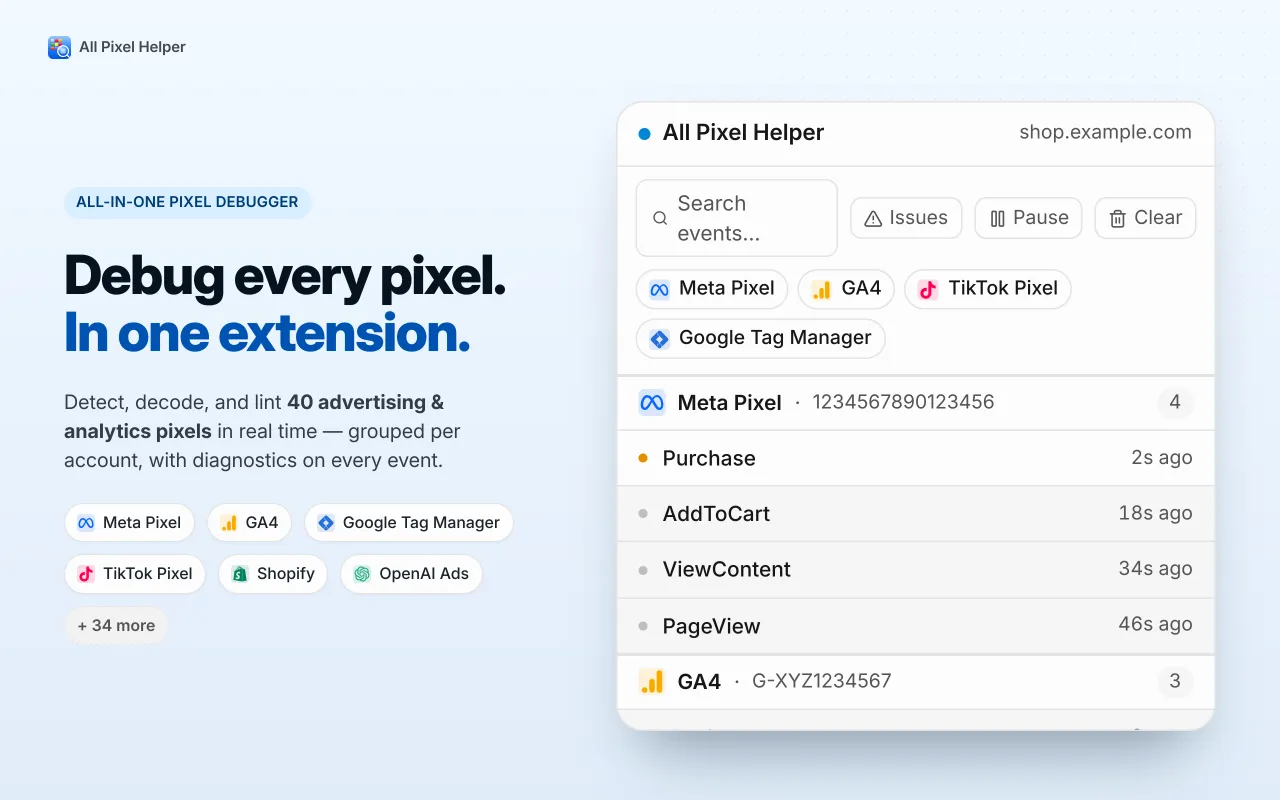

All Pixel Helper Every pixel it finds on the page, grouped by the account it belongs to, with the events each one sent and how long ago.
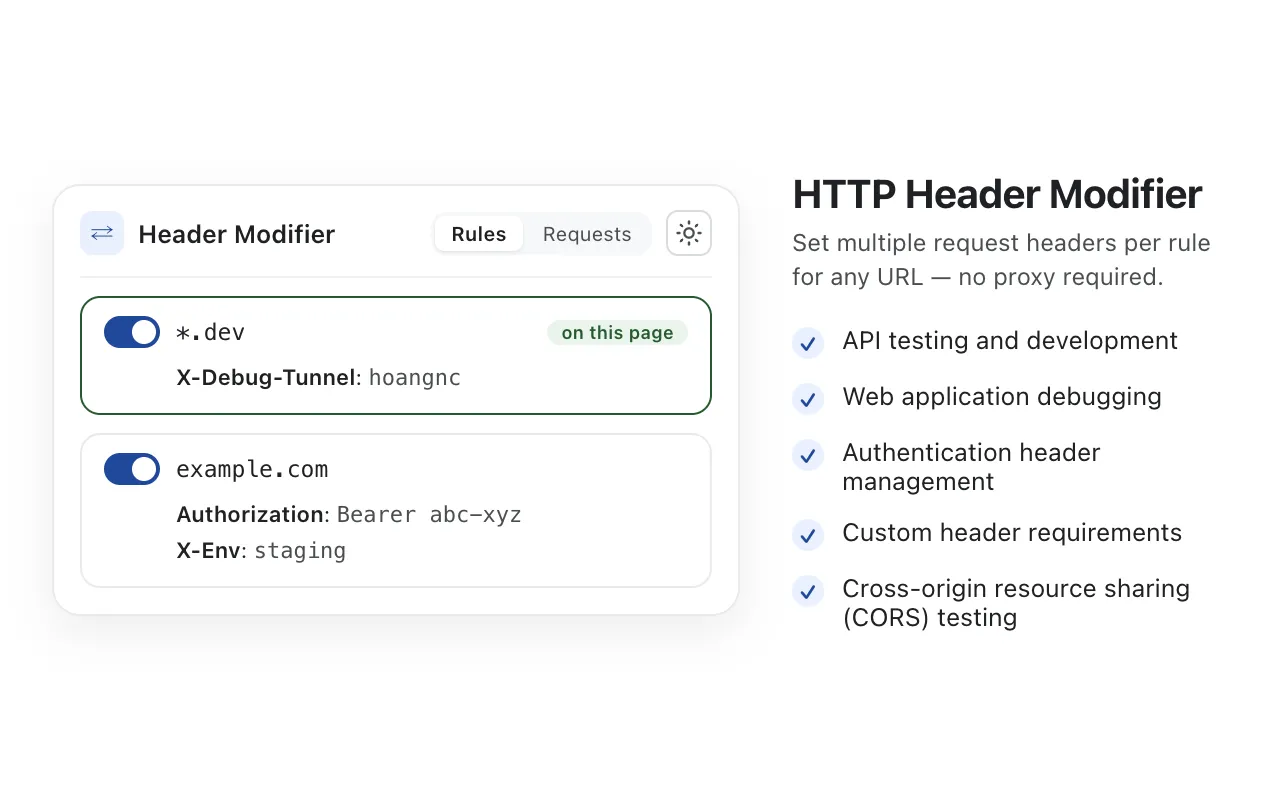

HTTP Header Modifier Header rules scoped to a URL pattern. The rule matching the page you are on is marked, so you can tell which one is in effect.
B2B Gold builds software for Shopify merchants and for the people who have to debug their tracking — narrow tools that each do one job, maintained and supported in-house rather than assembled from someone else's platform.
No scripted first tier and no handoff queue. A question goes to whoever maintains the app, and a real defect ships as a release rather than a workaround.
X Shield carries the Built for Shopify badge, which Shopify grants for meeting its requirements on performance, admin embedding and merchant reviews.
No suites, no bundles, no upsell into a platform you did not ask for. If you only need the country blocker, you install the country blocker.
Every app here is published and maintained on its own store listing, with a version history and update date you can check before you install anything.
Or email support@b2bgold.app: it reaches whoever maintains the app.
No. The Shopify apps install from their App Store listing and are set up from your Shopify admin. All Pixel Helper installs from the Chrome Web Store like any other extension.
cPixel sends to seven platforms: Meta, TikTok, Google Analytics 4, OpenAI’s ChatGPT Ads, Google Ads, Pinterest and Snapchat. Six of them also get events from cPixel’s servers: Meta and TikTok get the shopping funnel and the purchase, GA4 gets purchases and refunds, ChatGPT Ads and Pinterest get checkouts and purchases, and Snapchat gets checkouts, the payment step and purchases. Google Ads gets a browser tag only, which fires the purchase on the Thank you page.
It is Shopify's own quality mark. An app earns it by meeting Shopify's requirements for performance, admin embedding and merchant reviews, and it is removed again if the app stops meeting them.
All Pixel Helper is a free Chrome extension that lists and decodes the requests a web page sends to 40 ad and analytics platforms, including Meta, TikTok, GA4, Google Tag Manager and Shopify, and marks each one delivered, failed or blocked. It also shows every dataLayer push, with paths you can copy into Tag Manager, and the consent signals on Google, Meta, Microsoft and TikTok requests.
Email the studio, or use the support link on the app listing. Questions go straight to engineering — there is no scripted first tier in between, and a reply comes from someone who can read the code.
Each app installs on its own and works without the others.


